BIG LOADER
An All-In-One Reverb IR Loader
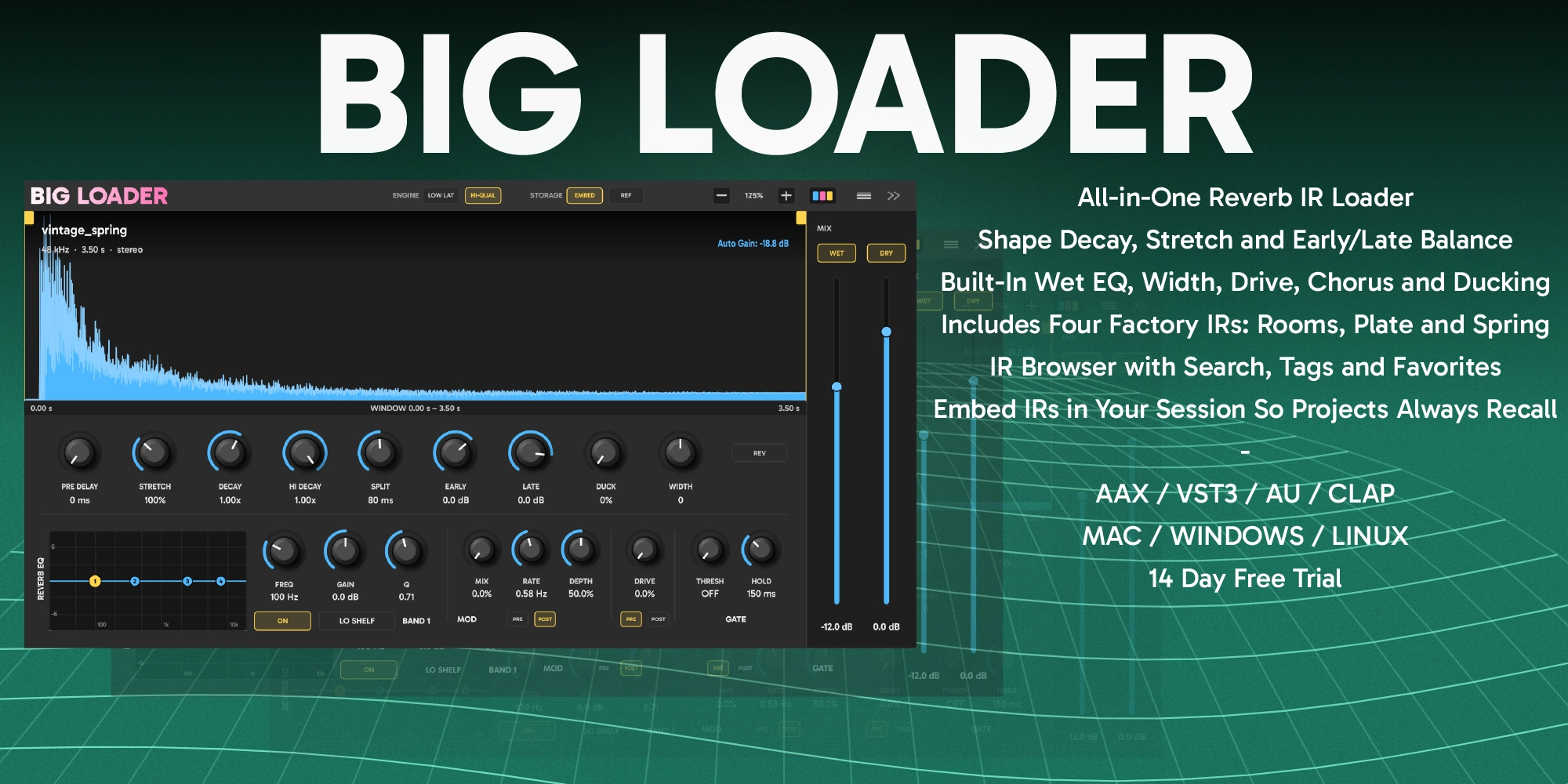
Big Loader is an all-in-one reverb IR loader. Load a plate, a spring, a hall or a room you captured yourself, then shape it into the space your mix needs without leaving the plugin. Trim the impulse, stretch it, set its decay and damping, and balance the early reflections against the tail, then finish the reverb with width, a four band EQ, chorus, drive, ducking and a gate. A built-in browser keeps your whole IR library a click away.
$27 · One-time purchase · 14-day free trial
Convolution reverb features
What Big Loader does with an impulse once it is loaded.
Any impulse, at the same level
WAV, AIFF, FLAC, OGG and MP3 at any sample rate, in mono, stereo or four channel true stereo. Every IR is matched in level as it loads, so you can audition a whole folder without riding the fader.
Reshape the space itself
DECAY lengthens or shortens the reverb relative to the impulse's own decay without changing its tone. HI DECAY damps the top end the way soft furnishings do in a real room. STRETCH resizes the whole space, with pitch following the way it would on varispeed tape.
Early reflections and the tail, apart
SPLIT sets where the early reflections end and the tail begins. EARLY and LATE then set each one's level, so a hall can become a tight ambience, or a room can lose its walls and simply bloom.
Trim, delay, reverse
Drag the tabs on the waveform to trim the start or the tail of the impulse. PRE DELAY holds the reverb back by up to half a second to keep the source clear, and REV plays the impulse backwards for reverse swells.
Width and EQ on the reverb alone
WIDTH narrows the reverb all the way to mono or spreads it wider, and a four band EQ with bell, shelf and cut shapes keeps the mud and the fizz out of the tail. Neither one ever touches the dry signal.
Chorus and drive, before or after
A multi-voice chorus that wanders rather than sweeps, and a tube-style drive that goes from warm to openly distorted. Put either one before the IR to feed the reverb a moving or saturated source, or after it to work on the reverb itself.
Ducking and the gate
DUCK pulls the reverb down while the dry signal is playing and lets it swell back in the gaps. The gate opens on the dry input and holds for as long as you set, for the classic gated drum sound from any impulse.
Zero latency when you need it
LOW LAT runs with no latency at all, for tracking and playing live through the reverb. HI-QUAL is the efficient engine for mixing, and reports its latency to the host so everything stays aligned.
Your library, one click away
The built-in browser keeps your IR folders beside the plugin with search, tags and favorites, plus four factory IRs to get started. The impulse is saved inside your session, so projects open with the right reverb on any computer.
Windows, macOS and Linux. VST3, AU, AAX and CLAP.
Every format and platform is included in one licence.
Native Linux builds
VST3 and CLAP compiled for Linux. Reaper, Bitwig, Ardour.
CLAP on all three platforms
CLAP for Windows, macOS and Linux.
AAX for Pro Tools
PACE signed AAX for Pro Tools on Windows and macOS.
Apple Silicon and Intel
Universal binary back to macOS 10.13, notarized and stapled. VST3, AU, AAX and CLAP in one installer.
How to use it
Three steps from an impulse to a finished reverb
Load an impulse
Open the browser and double-click an IR, or drop a file onto the waveform. Put Big Loader on a return and switch DRY off, so only the reverb comes back.
Shape the space
Set how long it rings with DECAY and how bright it stays with HI DECAY. Add PRE DELAY to keep the source clear of its own reverb.
Finish the reverb
Clean up the tail with the reverb EQ, set its width, then bring it in with WET. Reach for the chorus, drive, ducking or gate when the mix asks for more.
Specifications
Formats, platforms, processing and controls
- Plugin formats
- VST3, AU, AAX, CLAP
- Platforms
- Windows 10+, macOS 10.13+ (Intel and Apple Silicon), Linux
- Impulses
- WAV, AIFF, FLAC, OGG, MP3. Mono, stereo or four channel true stereo, any sample rate
- Engines
- LOW LAT at zero latency, HI-QUAL with latency reported to the host
- Shape
- Window, Stretch 50 to 200%, Decay 0.25 to 1.5x, Hi Decay above 4 kHz, Early/Late split, Reverse
- Reverb
- Pre Delay 0 to 500 ms, Width mono to +100%, Duck up to 24 dB
- Reverb EQ
- Four bands: Bell, Low Shelf, High Shelf, Low Cut, High Cut, ±18 dB, optional spectrum
- Effects
- Multi-voice chorus and tube-style drive, each before or after the IR
- Gate
- Keyed from the dry input, hold 20 to 800 ms
- Mix
- Separate wet and dry faders, -60 to +12 dB, each with its own mute
- Library
- Built-in browser with search, tags and favorites. Four factory IRs. IR saved in the session
- Licence
- $27 one-time. Every format and platform included
Frequently asked questions
Impulses, latency, sessions and the trial
Does Big Loader come with impulses?
Yes. Four factory IRs are built into the plugin: Large Digi Room, Large Drum Room, Vintage Digi Plate and Vintage Spring. They appear in the browser the first time you open it, and they sit alongside your own library with the same search, tags and favorites.
What IR files can it load?
WAV, AIFF, FLAC, OGG and MP3, at any sample rate. Mono files play on both sides, stereo files play left into left and right into right, and four channel files are treated as true stereo, with each input feeding both outputs through its own pair of impulses.
Does it add latency to my mix?
Only if you choose to. The LOW LAT engine runs at zero latency for tracking and playing live. The HI-QUAL engine is the default and the most efficient for mixing. It adds a small latency that depends on the buffer size and reports it to the host, so delay compensation keeps everything aligned.
Will my sessions open on another computer?
Yes. By default Big Loader saves the IR audio inside the session, so a project opens with the right reverb on any machine whether or not the IR file is there. If you would rather keep sessions small, switch STORAGE to REF and only the path to the file is saved.
Is there a free trial?
Yes, 14 days, fully functional with no feature limits and no credit card required. You can activate a licence at any point from the plugin's about panel without reinstalling.
Download the free 14-day trial
Fully functional, no feature limits, no credit card needed
14-day trial · All features included · No credit card required
Activate a license anytime from the plugin's about panel