BIG LISTEN
A/B Reference Plugin for Mixing and Mastering
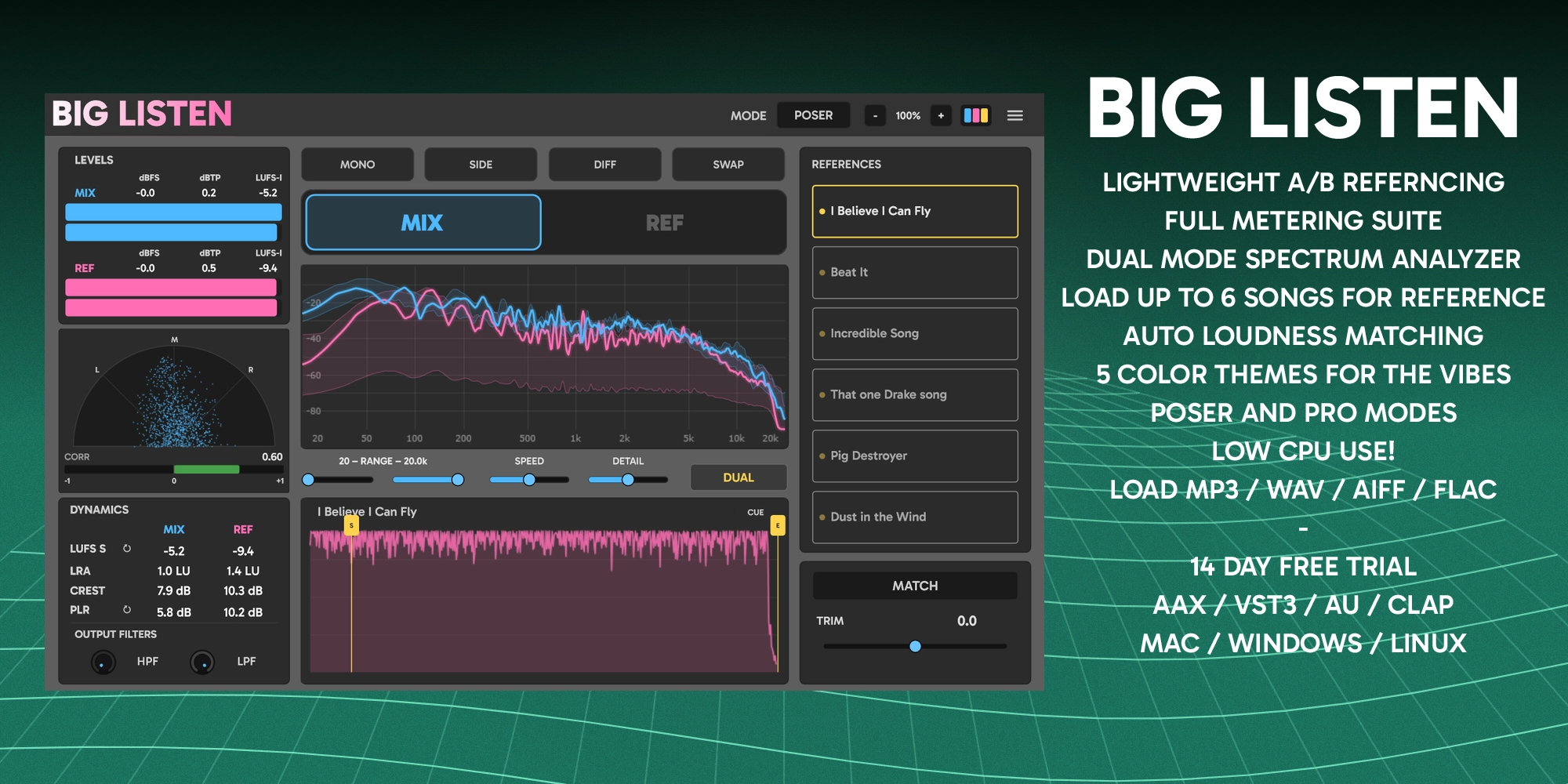
Mix and master with context. Load up to six reference tracks, match their loudness to your own, and switch between the two on one button with LUFS, true peak and spectrum metering live on both. Your whole reference library is searchable inside the plugin, so you stop guessing whether your low end, your top, your width and your weight are really where they should be. VST3, AU, AAX and CLAP on Windows, macOS and Linux.
$32 · One-time purchase · 14-day free trial
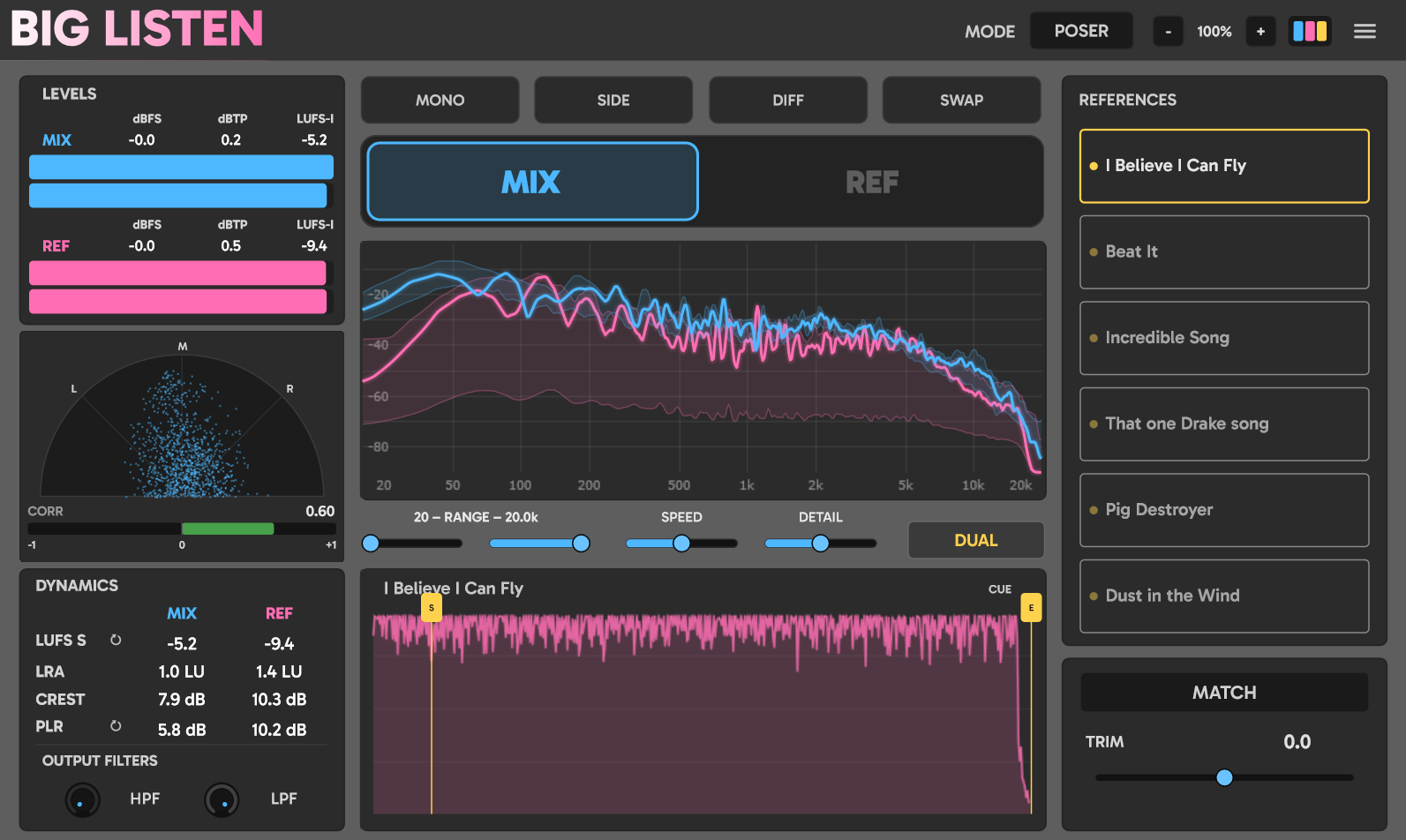
Reference monitoring and metering features
Everything Big Listen does when it is sitting at the end of your master chain.
Reference BrowserNEW
Point Big Listen at the folders where your music lives and your whole library is one click away. Search by name or genre tag, star the records you keep coming back to, and drag straight onto a slot. Tag files with 28 built in genres or your own, and it all follows you into every session. The index handles up to 30,000 files.
Six Reference Slots
Drag and drop up to six tracks. Each slot keeps its own loop markers, trim, match state and nickname, and all of it saves with the project. Streamed from disk, so a full album does not land in RAM. WAV, AIFF, FLAC, MP3 and OGG everywhere, plus M4A on Windows and macOS.
One Button A/B
MIX passes your mix through untouched. REF replaces the output with the selected reference. Both sets of meters read from the same taps at the same time, so the numbers never jump when you flip. A 10 ms crossfade keeps the switch click free, and you can put it on a key.
MATCH loudness matching
Press it while your mix plays. Three seconds of measured short term LUFS and the reference is trimmed to sit at your loudness, so the louder record never wins the comparison by default. It trims the reference, never your mix, and it refines an existing trim rather than wiping it.
Loop Markers, CUE, LATCH and SYNC
Park on a chorus and cycle it. Drag the S and E tabs to set a region, needle drop anywhere in the waveform. CUE restarts the reference on every flip, LATCH keeps it running, and SYNC locks it to the host timeline so their chorus lands where yours does.
Full Loudness Suite
LUFS momentary, short term and integrated to BS.1770. True peak at 4x oversampling with hold. LRA, crest factor, PLR and PSR. Mix and reference side by side, always live. Stop the transport and every number holds so you can actually read the pass you just played.
Analyzer and Stereo Field
Real time spectrum with a dual overlay, so the reference curve keeps tracking while you audition your mix. Adjustable range, speed and detail, plus mouse zoom and pan. Goniometer and correlation meter underneath.
Monitor Tools and Filters
MONO, SIDE, DIFF and SWAP, all host automatable. A high pass and a low pass on the monitor path, applied to both programs, with the analyzer shading the region you are not hearing.
Poser and Pro Modes
Pro is not just a visual crop. With the analyzer and goniometer hidden, Big Listen stops doing that analysis altogether, so Pro costs meaningfully less CPU. All the metering stays fully live.
Five Themes
Classic, Hi-Vis, Mint, Airtime and Ghost. Each sets the mix and reference identity colors used everywhere in the window. Status colors stay fixed, so red always means trouble. Remembered globally.
Runs in every major DAW
VST3, AU, AAX and CLAP. Logic Pro, Ableton Live, FL Studio, Cubase, Pro Tools, Reaper, Bitwig, Studio One, Ardour.
Zero Latency
No delay compensation required, 64-bit internal processing, 44.1 kHz to 192 kHz. It is a monitoring insert, so bypass or remove it before you bounce.
Windows, macOS and Linux. VST3, AU, AAX and CLAP.
Every format and platform is included in one licence.
Native Linux builds
VST3 and CLAP compiled for Linux. Reaper, Bitwig, Ardour. WAV, AIFF, FLAC, MP3 and OGG references.
CLAP on all three platforms
CLAP for Windows, macOS and Linux, built from the same source as the VST3.
AAX for Pro Tools
PACE signed AAX for Pro Tools on Windows and macOS.
Apple Silicon and Intel
Universal binary back to macOS 10.13, notarized and stapled. VST3, AU, AAX and CLAP in one installer.
How to A/B your mix against a reference track
Three steps to an honest comparison
Load a reference
Insert Big Listen at the end of your master chain, then point the browser at your music folder and double click a track. Or drag a file straight onto one of the six slots.
Hit MATCH
Play a representative section and click MATCH. It listens for three seconds and trims the reference to your mix's loudness, so louder never wins.
Flip and listen
Click MIX / REF to switch. Set loop markers to cycle a chorus, watch the dual analyzer, and check mono, side and phase without leaving the plugin.
Specifications
Formats, platforms, metering and processing
- Plugin formats
- VST3, AU, AAX, CLAP
- Platforms
- Windows 10+, macOS 10.13+ (Intel and Apple Silicon), Linux
- Latency
- Zero. No delay compensation required
- Reference slots
- Six, streamed from disk, up to 30 minutes each
- Reference file formats
- WAV, AIFF, FLAC, MP3, OGG on all platforms. M4A (AAC and ALAC) on Windows and macOS
- Reference browser
- Unlimited folders, up to 30,000 files, name and tag search, favorites, 28 genre tags plus your own
- Loudness match
- 3 second short term LUFS, up to ±24 dB of trim
- Metering
- BS.1770 LUFS (M / S / I), 4x true peak, LRA, crest, PLR and PSR, goniometer and correlation
- Processing
- 64-bit internal, stereo in and out, 44.1 kHz to 192 kHz
- Licence
- $32 one-time. Every format and platform included
Frequently asked questions
Formats, platforms, latency and how reference monitoring actually works
What is an A/B reference plugin?
A reference plugin lets you compare your own mix against commercially released tracks without leaving your DAW. You load reference files into the plugin, it matches their loudness to yours so the louder one does not automatically sound better, and you switch between the two instantly. Big Listen sits at the end of your master chain and does that on one button, with metering on both songs at once.
Does Big Listen run on Linux?
Yes. Big Listen ships native VST3 and CLAP builds for Linux, so it runs in Reaper, Bitwig, Ardour and anything else that hosts those formats. Reference playback on Linux covers WAV, AIFF, FLAC, MP3 and OGG. M4A is Windows and macOS only.
Is there a CLAP version?
Yes. CLAP builds are included for Windows, macOS and Linux, alongside VST3, AU and AAX. One licence covers every format and every platform.
Does Big Listen work in Pro Tools?
Yes. Big Listen includes a PACE signed AAX Native build for Pro Tools on Windows and macOS.
Does it add latency to my mix?
No. Big Listen reports zero latency and needs no delay compensation. In MIX mode your audio passes through untouched. It is a monitoring insert, so bypass or remove it before you bounce.
What audio file formats can it load as references?
WAV, AIFF, FLAC, MP3 and OGG on all three platforms, plus M4A including AAC and ALAC on Windows and macOS. Each slot streams from disk, so loading a reference does not pull a whole album into RAM.
Is there a free trial?
Yes, 14 days, fully functional with no feature limits and no credit card required. You can activate a licence at any point from the plugin's about panel without reinstalling.
Download the free 14-day trial
Fully functional, no feature limits, no credit card needed
14-day trial · All features included · No credit card required
Activate a license anytime from the plugin's about panel